Implementation
This section outlines the steps and considerations for acquirer-level implementation of Card Present Connect as part of your solution. For more information about portfolio ownership and functional usage, see the Partner Portfolio Overview.
Testing and certification at the acquirer/processor level for Card Present Connect with your direct connection or might include, but not be limited to, these card-present specific functions:
- EMV certification (contact and contactless)
- Setup of PIN or Data Encryption Service and key management
- Verification of capture files
For more information, contact your implementation manager.
Understanding Boarding with Card Present Connect
The Boarding service is flexible, enabling a client to build a hierarchy based on the needs of their business. For example, one business might use a simple hierarchy for a single merchant, and another might use a complex hierarchy to manage their omni-channel business with different types of payment systems and locations.
An acquirer is assigned to a portfolio account when they sign up for services. Card Present Connect is available to portfolio owners in the Product Enablement section of the . If the product is not visible or accessible, contact your account manager.
This is an overview of hierarchy roles:
- Portfolio: The portfolio organization is always the top node in the business hierarchy. All merchant organizations associated with the acquirer are subordinate to the portfolio account.
- Merchant: The merchant organization represents a business entity such as a brand or company. Only one merchant can reside in any branch of the hierarchy. This part of the hierarchy consists of a merchant organization and its subordinate organizations, which must include at least one transacting organization.
- Structural: The structural organization is a business entity that enables clients to build an expansive hierarchy between merchant and transacting nodes in the portfolio.
- Transacting: The transacting organization is a business entity that processes payment transactions. For example, it could be a physical store or a payment form on a merchant's web page or app. No other organization can be directly subordinate to a transacting organization.
For more information about organizations and accounts, see the Merchant Boarding Guide.
This diagram shows a simple hierarchy that includes two structures: one for physical stores to process card-present (CP) transactions and another for an e-commerce business to process card-not-present (CNP) transactions.
Configuring and Managing Merchants
When enabling Card Present Connect in the , use separate transacting organizations for card-present and card-not-present organizations. A card-present-transacting organization must be a physical store location.
Before enabling Card Present Connect, you must enable the Card Processing product in the Product Name table on the Transacting Organization and Products Page and in the Product Enablement > Payments section.
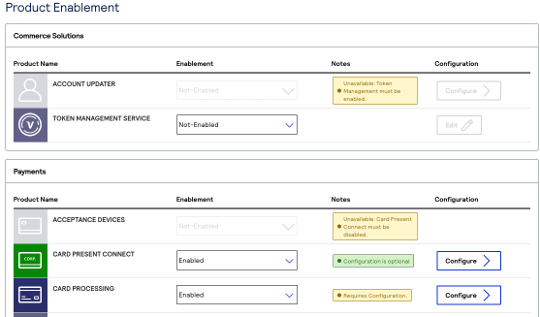
In the Portfolio Management module of the , you can use the Create Merchant process or Add Products process to enable Card Present Connect. For detailed instructions, see Board Merchants Quick Start.
Start Boarding API Integrations
Before you begin boarding activities, see the Boarding API reference for prerequisite tasks and other information: POST /boarding/v1/registrations
When you use an API with Card Present Connect to board a merchant, the Card Present Connect product must be enabled in the Payments section of Selected Products in the .
Thanks for your feedback!
Last published: November 18, 2026