Implementation
How to Enable Pay by Link as a Reseller Portfolio User
Pay by Link is an enablement only product, and when enabled for a merchant, it does not require any additional configuration.
To enable Pay by Link, you can use the API or the .
Prerequisites to Enable Pay by Link
Before you can enable Pay by Link, merchants must complete these prerequisites:
- Merchant Account: active merchant account with .
- Unified Checkout: Unified Checkout enabled for streamlined payment processes.
- Card Payments: enabled by default for Unified Checkout.
- Digital Wallets and Alternate Payment Methods: merchants can enable these, or you can enable them on the merchant's behalf.
- Fraud and Risk Security: enable fraud and risk management tools and 3-D Secure payer authentication, which is required in some regions, for secure transactions.
Enabling Pay by Link for New Merchants in the
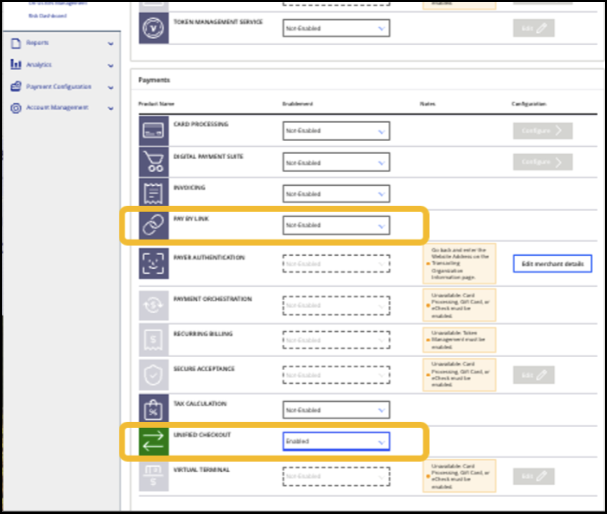
- Add a new merchant: add the new merchant to the system. Ensure all required details are correctly provided.
- Select boarding type: choose the appropriate boarding type based on the merchant's requirements.
- Complete merchant information form: provide all of the relevant details.
- Enable Unified Checkout: activate Unified Checkout to streamline the payment process.
- Activate Pay by Link: allow the merchant to start generating payment links.
Enabling Pay by Link for Existing Merchants in the
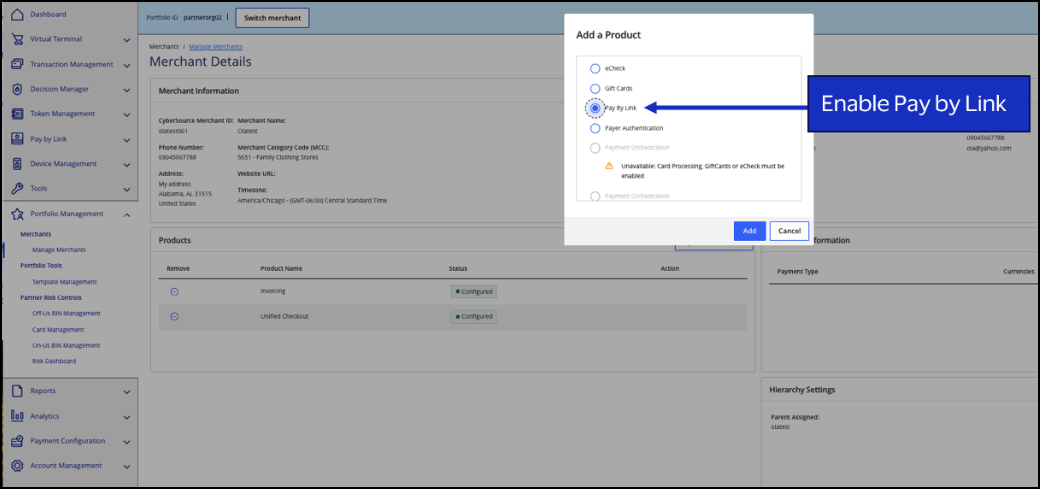
- Search for an existing merchant: find the merchant in the system using the search function.
- View the merchant's profile: access the merchant's profile to review their current setup.
- Enable Unified Checkout: activate Unified Checkout if it is not already enabled.
- Activate Pay by Link: allow the merchant to generate and share payment links.
Enabling Pay by Link for Merchants Using the Boarding API
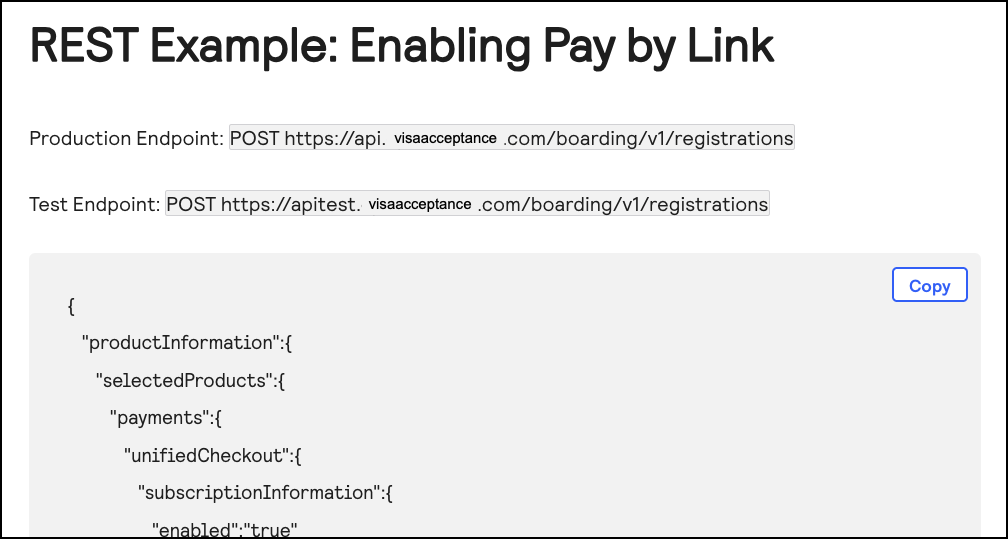
Use the Boarding API to enable Unified Checkout and activate Pay by Link. For more information, see the Pay by Link section in the Merchant Boarding User Guide for the REST API.
How to Integrate with Pay by Link
This section describes how you can integrate with Pay by Link as a partner using your portfolio account or supporting your merchants who are integrating to the API.
Creating and Sharing Payment Links
Merchants can create fixed-price or customer-set price links using Pay by Link APIs. These links can be sent by email, SMS, or any other communication channel. This flexibility allows merchants to reach their customers wherever they are and facilitate quick and easy payments.
See Create a Fixed-Price Link and Create a Customer-Set Price Link specifications in the Pay by Link Developer Guide.
Receive Payment Notifications from Webhook Subscriptions
Merchants can receive real-time updates on payment statuses by subscribing to webhook notifications. This ensures that merchants stay informed when payments are received and can provide timely responses to their customers. For more information about how to subscribe to webhook notifications, see the Webhooks Guide.
Authenticate Pay by Link API Requests
Pay by Link APIs can be authenticated using REST API keys, meta keys, or OAuth:
- OAuth: use OAuth authentication when a connector, such as a plugin or add-in, needs to connect to the Pay by Link APIs. This displays a login screen and a screen that enables the user to grant permission to access Pay by Link APIs.
- REST API keys: if you want your system to send Pay by Link API requests and still control your user interface, you can use REST API keys. For more information about how to create a REST API key, see REST API Key with a P12 File in the Security Keys User Guide.
- Meta keys: if you are boarding merchants and need to send Pay by Link API requests on behalf of several merchants, then you can use a type of REST API meta key that enables your portfolio account to send API requests for all transacting MIDs in the portfolio. For more information about how to create and manage meta keys, see the Meta Key Creation and Management section in the Security Keys User Guide.
Best Practices for Using Payment Links in Different Channels
Adjust payment link formats based on the distribution channel, such as social media, email, and SMS, to enhance your payment process and customer experience.
These are some best practices for each channel:
- Email:
- Clear Call-to-Action: use prominent buttons or links with clear instructions to guide your customers to the payment page.
- Personalization: tailor the email content to the recipient, including personalized messages and relevant payment details.
- Security: ensure the email is sent from a recognizable and trusted address to avoid phishing concerns.
- Text (SMS):
- Concise Messaging: keep the message short and to the point. Include only essential information and the payment link. Messages can contain a maximum of 160 characters. Shorten the payment link appropriately using tools like TinyURL to condense your message.
- Single Link: use one link for each message to avoid confusion and improve click-through rates.
- Verification: send the payment request from a verifiable business phone number to build trust.
- Social Media:
- Engaging Content: integrate payment links in engaging posts or stories to capture attention.
- Consistency: ensure the payment link matches the branding and tone of your social media profile.
- Track Performance: use analytics to monitor the effectiveness of payment links and optimize accordingly.
- Digital Marketing:
- Integration: embed payment links in digital ads, landing pages, and email campaigns for a consistent user experience.
- Clear Call-to-Action: embed payment links in clear calls to action for accessibility.
- Physical Advertisements:
- QR Codes: use QR codes on flyers, posters, and billboards to direct customers to the payment page.
- Clear Instructions: provide clear instructions on how to use the QR code or payment link.
- Visibility: ensure the payment link or QR code is prominently displayed and easy to scan.
By following these best practices, you can enhance the efficiency and security of your payment processes across different channels.
Thanks for your feedback!
Last published: November 18, 2026