Implementation
This section describes how an acquirer and its merchants can enable and process PayPal and Venmo payments.
Enablement Options
If you are a partner reseller, how PayPal and Venmo are enabled for your transacting merchants depends on how you want to enable it for them, or if you want to allow your transacting merchants to enable it for themselves.
As a portfolio owner, how PayPal and Venmo are enabled for your transacting merchants depends on if you want your merchants to enable it themselves, or if you want to enable it using your portfolio account. These are the two options for enabling PayPal and Venmo for your merchants:
- Partner Enablement: you enable alternative payments and PayPal for each of your transacting merchants, acting as a solutions provider or all-in-one service enabler.
- Merchant Self Enablement: you delegate enabling alternative payments and PayPal to your transacting merchants. This is ideal if your transacting merchants want to process payments using more than the standard gateway card processing.
Prerequisites for Setting Up PayPal
Each transacting merchant that wants to accept PayPal and Venmo payments must contact PayPal to create a PayPal merchant account. When a transacting merchant begins creating a PayPal merchant account, PayPal automatically gives them access to the PayPal sandbox test environment. After PayPal approves their contract, the merchant can then use the PayPal production environment.
When the PayPal merchant account is created, the merchant must retrieve their PayPal credentials from the PayPal developer website. The PayPal credentials are required to enable PayPal and Venmo for the transacting merchant account in the .
These are the required credentials the merchant must retrieve:
- PayPal account ID
- PayPal merchant email
- PayPal secret key, also known as a secret phrase
- PayPal client ID
If a merchant already has a PayPal merchant account, they might have already completed these steps.
Retrieve PayPal Merchant Credentials
Merchants must follow these steps to obtain their PayPal account credentials:
Log in to the PayPal Developer Portal using your PayPal account credentials:
https://www.paypal.com/signin.From the PayPal Developer homepage, navigate to Apps & Credentials > Create App.
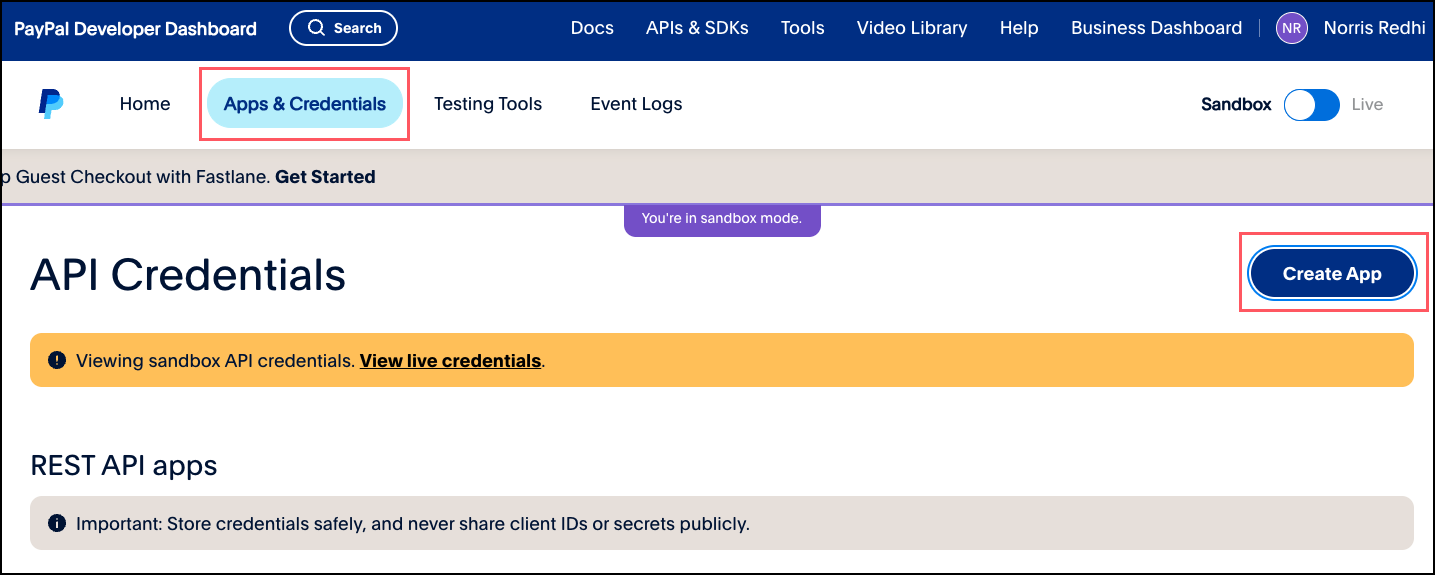
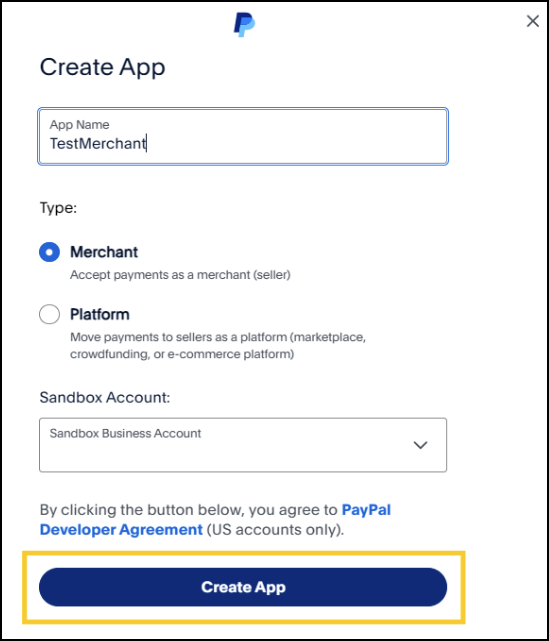
On the Create App window, enter your application name and choose your sandbox developer account. When done, click Create App.
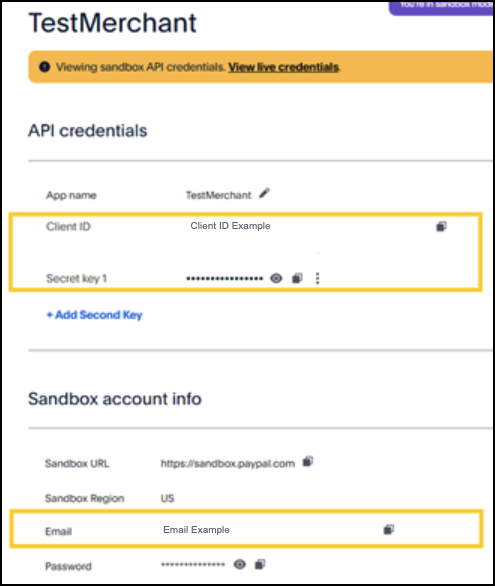
Click on the created app to retrieve your PayPal client ID, PayPal secret key, and PayPal email.
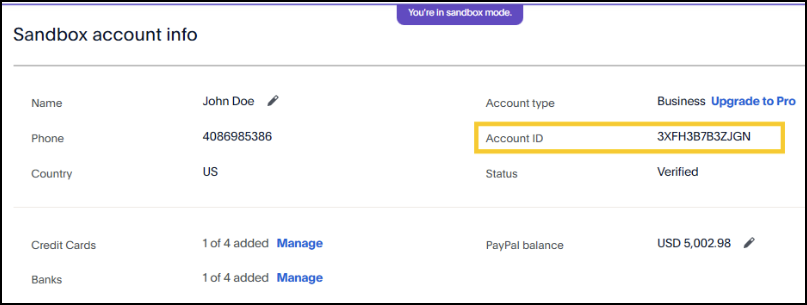
How you retrieve your PayPal account ID depends on whether you are logged in to your sandbox account or production account:
Sandbox: navigate to the sandbox account information for the app you created. Your account ID displays.
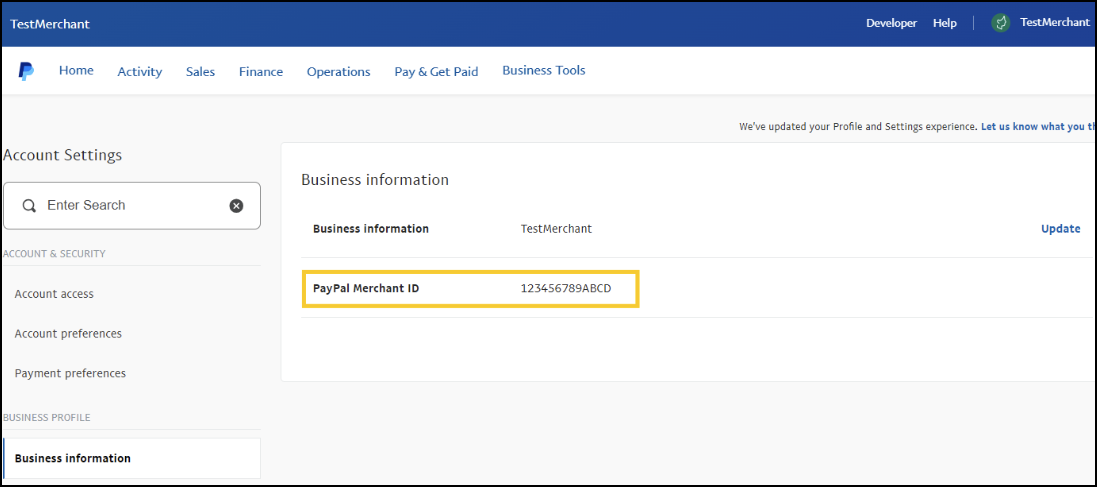
Production: at the top right of the screen, click the merchant icon with your user name and choose Dashboard > Business Dashboard. Click the top right icon again and choose Account Settings > Business information. Your PayPal account ID displays.
Enable PayPal and Venmo for Transacting Merchants
After a transacting merchant retrieves their PayPal account credentials, PayPal and Venmo payment processing can be enabled in the transacting merchant's account.
If you, as a portfolio owner, want to configure and enable PayPal and Venmo for your transacting merchant, see Acquirer Enablement. If you are delegating PayPal and Venmo enablement to your merchants, see Merchant Self Enablement.
Acquirer Enablement
This section describes how a portfolio owner can enable PayPal and Venmo for its transacting merchants, acting as a solutions provider or all-in-one service enabler.
Enable PayPal and Venmo
Follow these steps to enable PayPal and Venmo for a transacting merchant:
Log in to your portfolio account in the .
Set up and configure your transacting merchant accounts.
Choose to use an existing merchant or create a new merchant account.
Complete the relevant forms.
Add transacting merchants to your portfolio.
Enable Alternative Payment Methods and PayPal.
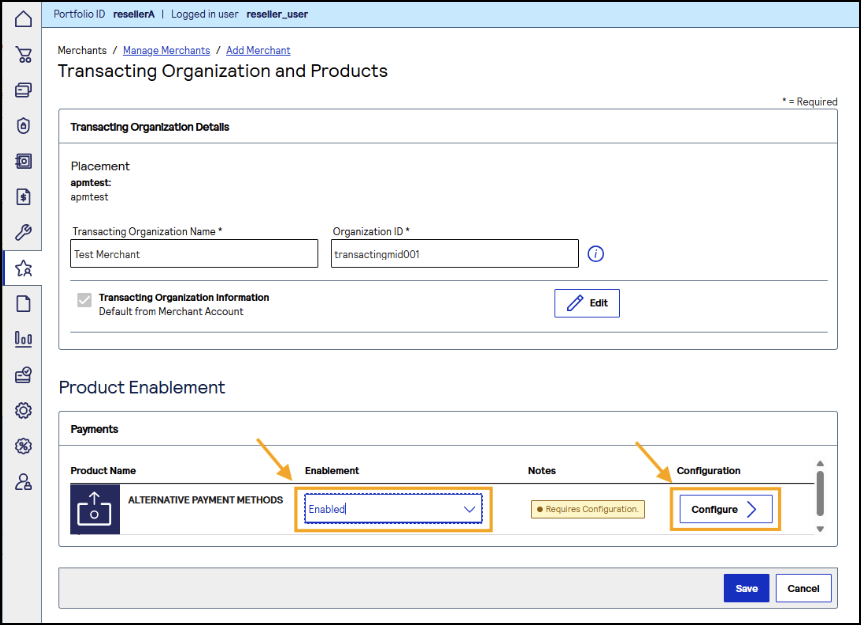
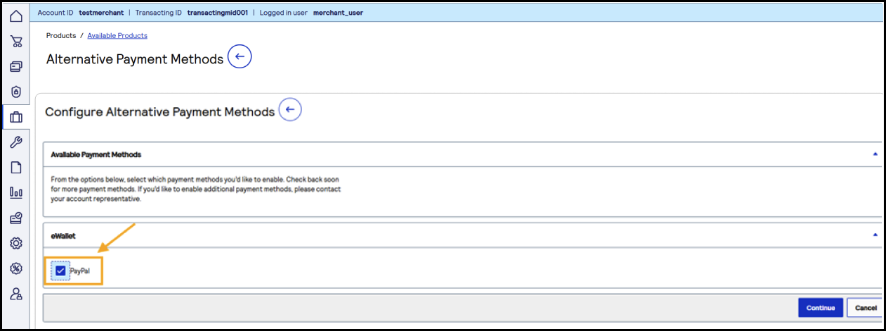
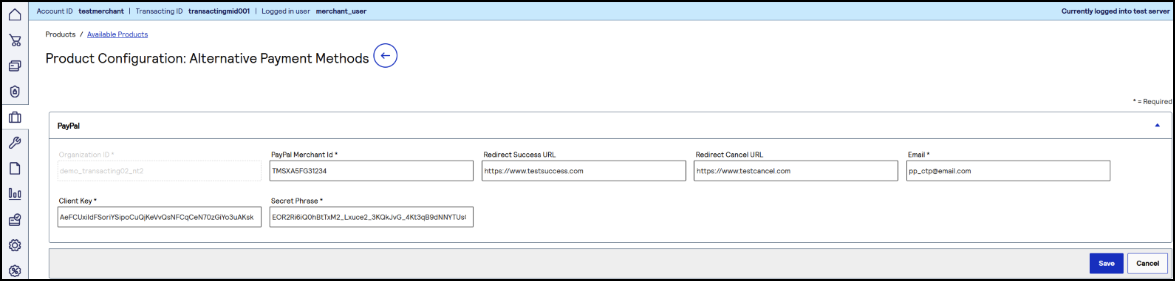
Configure the transacting merchant account with its PayPal account credentials. The merchant must provide you with its PayPal account credentials. For information about how a merchant can retrieve its PayPal account credentials, see Prerequisites for Setting Up PayPal.
Merchant Self Enablement
This section describes how transacting merchants can enable PayPal and Venmo for their own accounts.
A portfolio owner can delegate enabling alternative payments and PayPal, using the , to its transacting merchants. This is ideal if a transacting merchant wants to process payments using more than the standard gateway card processing. This method of enabling PayPal consists of two major tasks:
- The portfolio owner enables alternative payment methods for its transacting merchants.
- The transacting merchant configures its account using its PayPal credentials.
Enable Alternative Payment Methods Self-Enablement as a Partner
As the portfolio owner, follow these steps to enable alternative payment methods for your transacting merchants:
Log in to your portfolio account in the .
Choose to use an existing merchant account or create a new merchant account.
Add transacting merchants to the merchant account.
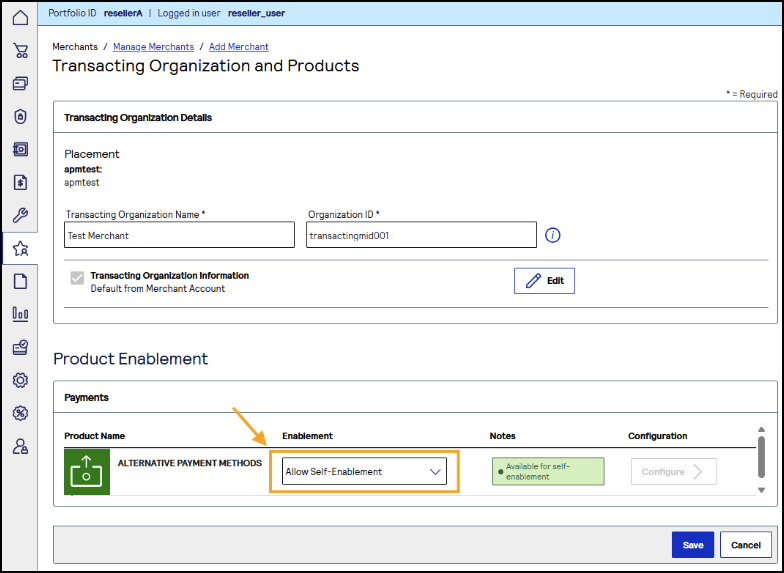
In Transacting Organization and Products, set Alternative Payment Methods to Allow Self-Enablement.
Enable PayPal and Venmo as a Merchant
As a transacting merchant, follow these steps to configure your account using your PayPal credentials. You can complete this task only after the portfolio owner enables alternative payment methods self-enablement:
Log in to your transacting merchant account in the .
Enable the Alternative Payment Methods and the self-serve ability.
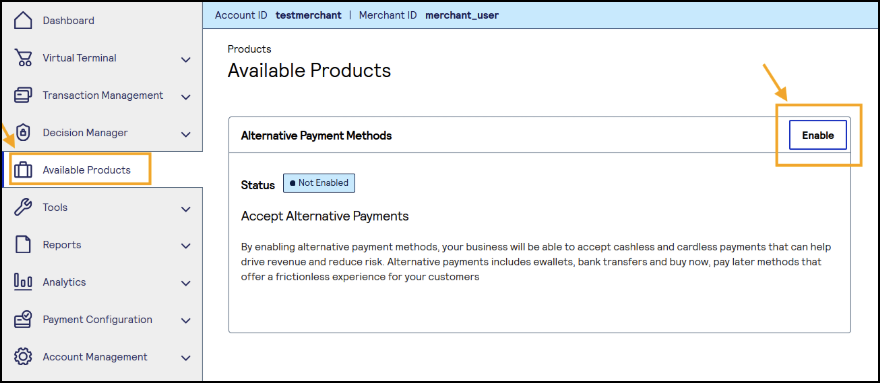
Enable the PayPal payment method.
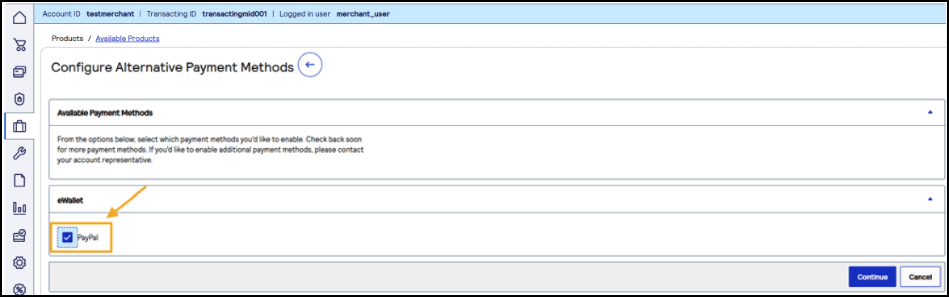
Configure the Alternative Payment Method parameters with your PayPal account credentials. For information about how to retrieve your PayPal account credentials, see Prerequisites for Setting Up PayPal.
Develop, Test, and Go Live
This section describes additional tasks and resources that acquirers and merchants need to complete to begin processing PayPal and Venmo transactions.
Refer to the Developer Guide
When an acquirer and its merchants complete all of the previous tasks, merchants can refer to the PayPal and Venmo Developer Guide. The developer guide provides information about how to send PayPal and Venmo transaction requests using the REST API.
Create Security Keys
Before merchants can send API requests to , a security key must be created for each transacting merchant. Depending on how a merchant is integrating with , the acquirer or the merchant can create the security key. For information about how to create security keys, see the Security Keys User Guide.
Test and Production Environments
There is a test and production environment for sending REST API requests:
- Test:
- Production:
recommends that transacting merchants test their requests using the test endpoint. When they confirm that their requests are successful, they can transition to processing payments using the production endpoint.
PayPal and Venmo Requests Overview
As a portfolio owner, familiarize yourself with the different API requests to better support your merchants. For information about the different requests that contribute to a successful transaction, see the Overview of PayPal Requests section in the PayPal and Venmo Developer Guide.
Thanks for your feedback!
Last published: November 18, 2026